INSTAGRAM PAGE ANALYSIS

Know your Instagram page by its numbers, and know what to post next.

Give the username of a public page: no password, no access. Its latest posts, formats, posting times, captions and hashtags, bio and highlights, comments and rival pages are read and measured, and you get a 13-part report: a score out of 100, the key findings, a step-by-step action plan and a content calendar for the next 4 weeks with ready captions and hashtags, all in one PDF.

Analyse your page See what it does

Start free with 500 gift credits

WHAT THE REPORT TELLS YOU

From today's numbers to tomorrow's post

The pictures here are from the app's real report for a sample page (@goftito.sample), untouched. The numbers are worked out by code from the page's public data; AI only explains them and writes the suggestions.

The page's score and key findings

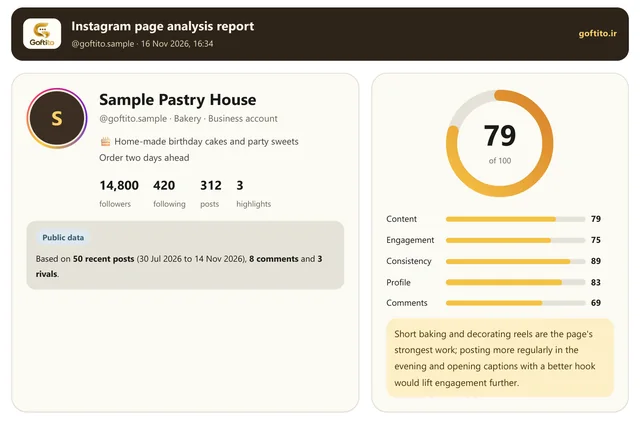
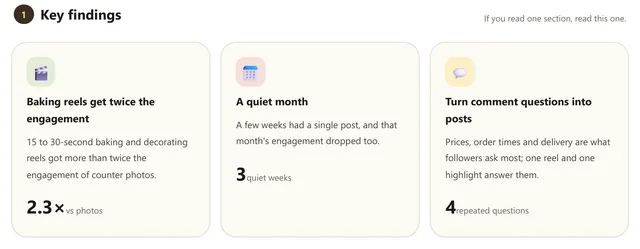
An overall score out of 100 with five sub-scores: content, engagement, consistency, profile and comments, and a short verdict. Then three key findings: a strength, a weakness and an opportunity, each with its figure.

  • Against pages of the same size
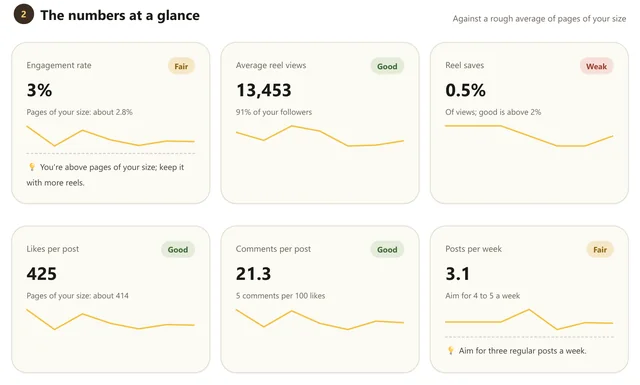
  • Six key numbers with a trend and a tip
Which format works

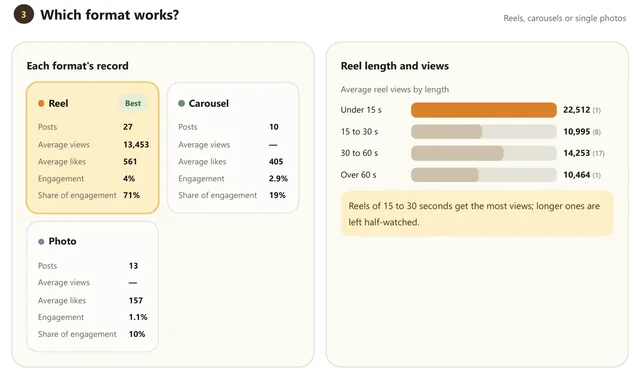
The record of reels, carousels and photos: how many, their likes, views and engagement, and the reel length that got the most views.

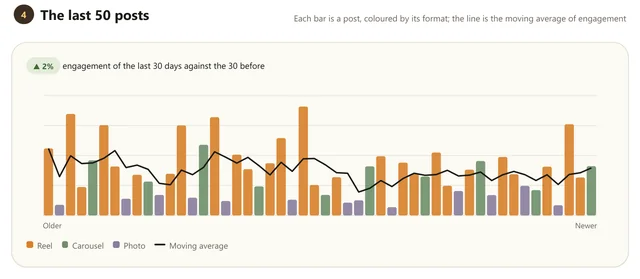
  • The latest posts on one chart
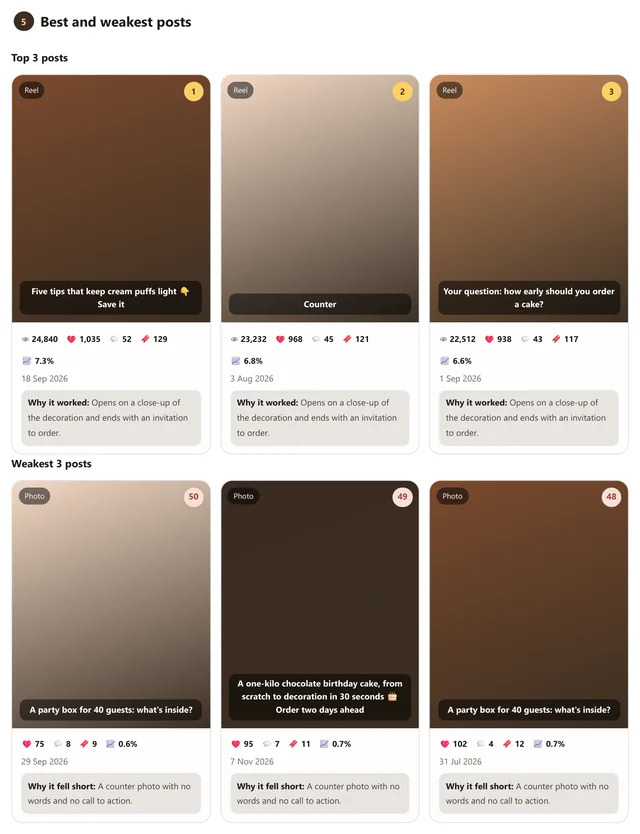
  • The top 3 and weakest 3 posts, with why

The best day and hour to post

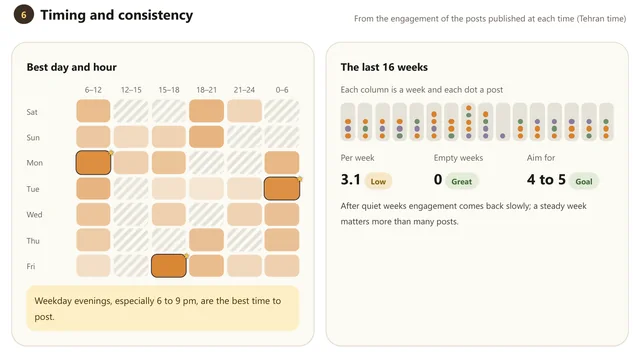
A map of seven days by six time slots, in Tehran time, from the engagement of what was posted at each, and how regularly the page posted over the last 16 weeks.

  • A weekly posting target
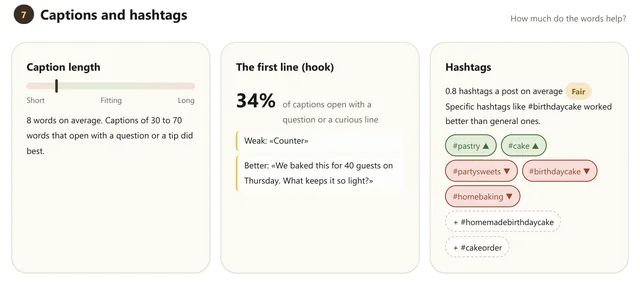
  • Caption length, the first-line hook and hashtags

What your audience says in comments

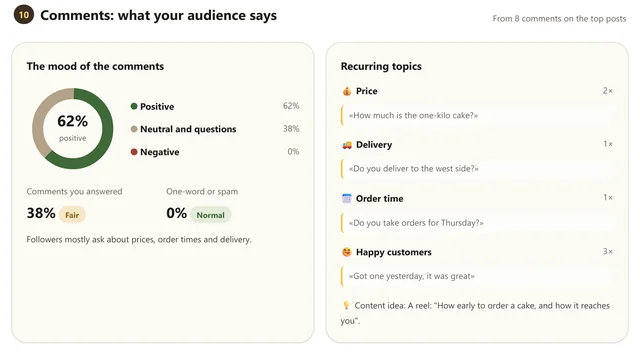
The mood of the comments, the topics people keep raising, quoted, how many questions you've answered, and an idea for a post that answers them.

  • A bio check and a ready suggested bio
  • Suggested highlights

Against rivals in your field

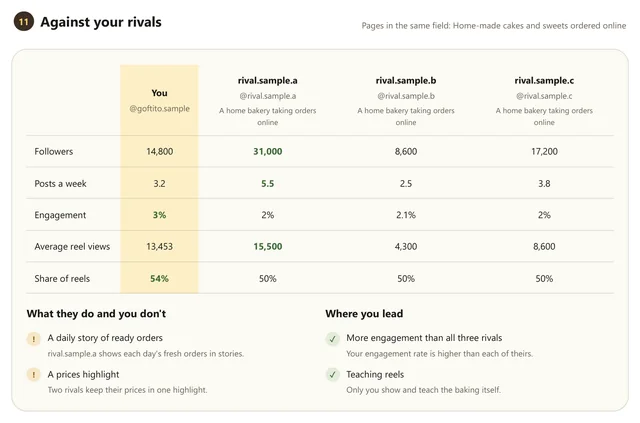
Pages that do exactly what you do are found, or you name up to three yourself. Followers, posts a week, engagement and reel views side by side, what they do that you don't, and where you lead.

  • Only pages in your field
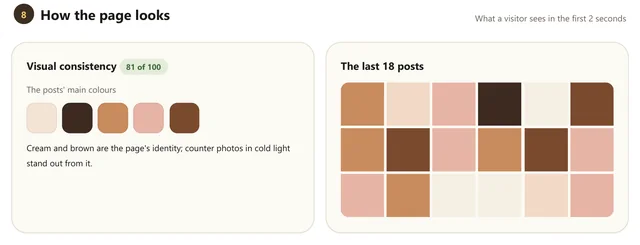
  • Your page's look and colours

A step-by-step action plan

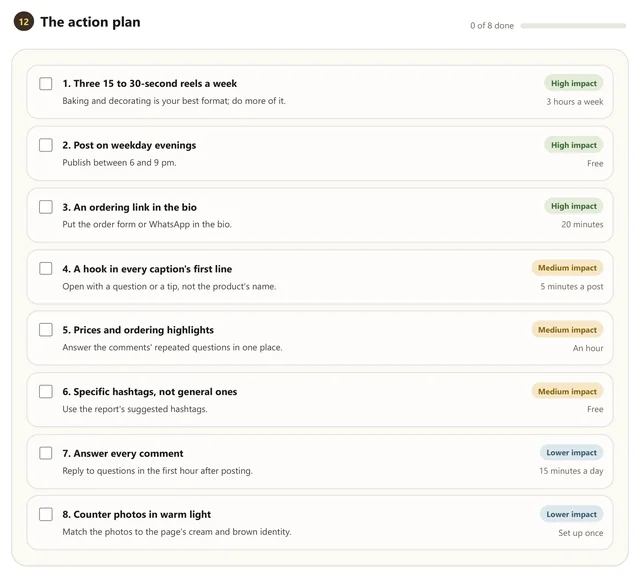
Up to eight specific tasks, by their impact, each with the time it takes; no generic advice. Tick what you've done and watch your progress.

  • Your ticks are saved
  • In the PDF too
WHAT YOU GET

The whole report, part by part

After the analysis you get these 13 parts, the appendix of ready texts and a PDF. Tap “See the sample” to see that part of the sample report.

  1. Summary

    The score and the page at a glance

    An overall score out of 100 and a verdict, beside the profile and its stats.

    • Five sub-scores: content, engagement, consistency, profile, comments
    • How many posts, comments and rivals it's based on, over what dates
    See the sample
  2. Part 1

    Key findings

    If you read one part, read this.

    • A strength, a weakness and an opportunity
    • Each with its figure
    See the sample
  3. Part 2

    The numbers at a glance

    The page's key numbers against a rough average for pages its size.

    • Engagement, reel views, likes and comments per post, posts a week
    • A good, fair or weak tag, a trend line and a tip
    See the sample
  4. Part 3

    Which format works?

    Reels, carousels or single photos, side by side.

    • Count, likes, views, engagement and share of each format
    • Reel length and the views of each length
    See the sample
  5. Part 4

    The latest posts' trend

    Each post a bar in its format's colour, with the moving average of engagement.

    • The last 30 days against before
    See the sample
  6. Part 5

    Best and weakest posts

    The top three and weakest three posts with their pictures and numbers.

    • For each: why it worked or didn't
    See the sample
  7. Part 6

    Timing and consistency

    When to post, and how regularly.

    • A 7-day by 6-slot map in Tehran time
    • The last 16 weeks and a weekly target
    See the sample
  8. Part 7

    Captions and hashtags

    How much the words help.

    • The right caption length and first-line hook, with a weak and a better example
    • Hashtags that worked or didn't, and suggested ones
    See the sample
  9. Part 8

    How the page looks

    What a visitor sees in the first two seconds.

    • Visual consistency out of 100 and the page's main colours
    • The grid of the latest posts
    See the sample
  10. Part 9

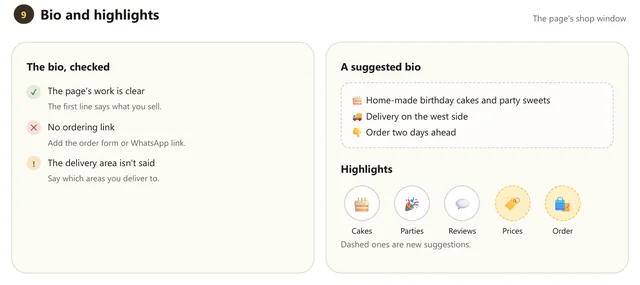
    Bio and highlights

    The page's shop window, checked.

    • What the bio has and lacks, and a ready suggested bio
    • The highlights and suggested ones
    See the sample
  11. Part 10

    Comments: what your audience says

    From the comments of the most engaging posts.

    • Positive, neutral and negative mood, and how many you answered
    • Recurring topics, quoted, and a content idea
    See the sample
  12. Part 11

    Against your rivals

    Pages that do what you do, beside yours.

    • Followers, posts a week, engagement, views and reel share
    • What they do and you don't, and where you lead
    See the sample
  13. Part 12

    The action plan

    Up to eight specific tasks, by impact.

    • High, medium or low impact and the time each takes
    • Ticks for what's done and a progress bar
    See the sample
  14. Part 13

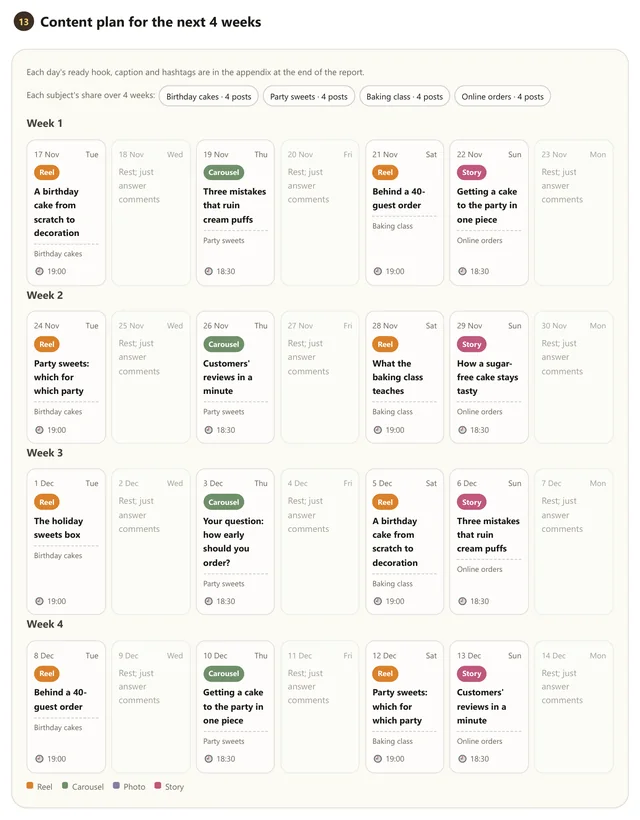
    Content plan for the next 4 weeks

    28 days from tomorrow: what to post on which day.

    • Each day's format, subject and hour, and rest days
    • A balanced share for each of the page's products or subjects
    See the sample
  15. Appendix

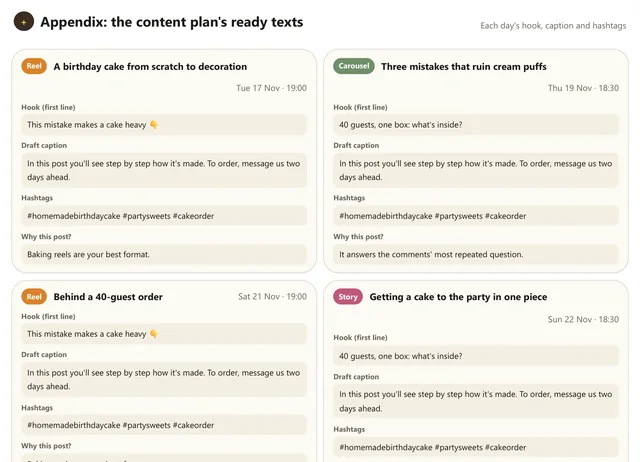
    Each day's ready texts

    For each day of the calendar, what you post is ready.

    • The hook (first line), a draft caption, hashtags and why that post
    • Copied in one click, and an appendix in the PDF
    See the sample
  16. PDF

    All of it in one PDF

    The whole report, laid out on A4, with all four weeks of the calendar and the appendix of ready texts; to keep or to send to your designer or page manager.

    Analyse your page
THE CONTENT CALENDAR

Four weeks planned, with captions and hashtags ready

The report doesn't stop at what isn't working; it says what to do from tomorrow. Each day of the next four weeks has its format, subject and hour, and its words are ready.

  • Reels, carousels, photos, stories and rest days, based on what works for this page
  • Every one of the page's products or subjects gets its share
  • Each day's hook, caption, hashtags and posting hour
  • All in the PDF, to keep or send to your designer or page manager
HOW IT WORKS

Four steps to your report

No password and nothing to install; just a username.

  1. Step 01

    Give the username

    Type the username or link of a public page. Name up to three rivals if you like; otherwise pages in the same field are found.

  2. Step 02

    See the cost before you start

    The estimated credit shows before you start. Credit is taken only once the report is ready.

  3. Step 03

    It's read and measured

    The latest posts, comments, highlights and rivals are read and worked out; usually a few minutes. The page needn't stay open.

  4. Step 04

    The report and the PDF

    The report stays in “My analyses”. Download the PDF, tick off the plan and measure again next month.

USES

Who it's for

Shops and small businesses

Know which posts bring customers, when to post and what your bio lacks.

Teachers and schools

See which lessons get saved and watched, and turn students' questions into posts.

Content creators

The format and reel length that work, and a plan for the month ahead.

Doctors, lawyers, consultants and personal brands

Check your shop window and your audience's trust, with specific suggestions.

Agencies and page managers

Measure a client's page before you sign and hand over the PDF report.

Before ads or collaborations

Before buying a promotion, see a public page's real engagement and audience.

COMPARED

Against a consultant and Instagram's own insights

An Instagram consultant or agencyInstagram's own Insights Goftito
Time An Instagram consultant or agency Usually a few days Instagram's own Insights Always there Goftito Usually a few minutes
Access An Instagram consultant or agency Often account access, or you pull the figures Instagram's own Insights Only your own page, with a professional account Goftito Just a username, no password
Rivals compared An Instagram consultant or agency Depends on the consultant Instagram's own Insights No Goftito Rivals in your field, side by side
Best format and hour An Instagram consultant or agency Down to the consultant's experience Instagram's own Insights Raw numbers; the conclusions are yours Goftito From the page's own posts
Plan and content calendar An Instagram consultant or agency Usually separate, at extra cost Instagram's own Insights No Goftito A plan and 4 weeks with ready captions and hashtags
Knowing the business and following up An Instagram consultant or agency Conversation, market knowledge and help carrying it out Instagram's own Insights No Goftito Only what the page's public data shows
FAQ

About the Instagram page analysis

Short answers to the questions people ask most.

Didn't find your answer? After signing in, open a support ticket; we'll text you when it's answered. Open a ticket
01 Do you need my password or access to the page?

No. Just the username or the page's link. Everything is read from the page's public data, what any visitor sees.

02 What exactly do I get?

A 13-part report: score and summary, findings, key numbers, formats, the posts' trend, best and weakest posts, timing, captions and hashtags, the page's look, bio and highlights, comments, rivals, an action plan and a 4-week calendar; plus each day's ready texts and a PDF of it all.

03 Can a private page be analysed?

No; only public pages. A private page has no public data.

04 Can I analyse a rival's page, or one I might work with?

Yes, any public page. Before buying a promotion or a collaboration, see that page's real engagement and audience.

05 How are rivals chosen?

If you name up to three pages, those are compared. Otherwise the page's field is read from its bio and posts, and only pages working in that field count as rivals; if none is found, there's no rivals part.

06 How accurate are the numbers?

Every number is worked out by code from the page's public data, not by AI. The “pages of the same size” average is a rough benchmark, not our measurement. On a very small page a few likes' difference is mostly chance, and the report says so instead of drawing firm conclusions.

07 How much does it cost?

You see the estimated credit before you start, and credit is taken only once the report is ready. An analysis that doesn't finish costs nothing.

08 Can I see the report again or send it to someone?

Yes. The report stays in “My analyses”, and you get a tidy PDF of it to keep or send to your designer or page manager.

The Instagram page analysis guide

READY?

Get to know your page

Give the username; a few minutes later you have a score, a plan and a 4-week calendar.